How to Access Tables
This tutorial will help you get started with querying the Bitpulse Data Catalog using BigQuery or via code.
Accesing Data Throught BigQuery Studio
Note: Before you can follow this tutorial, you must have already requested and been granted access to the Data Catalog. If you haven't done so yet, please visit the Access Permissions page to submit your access request.
After being granted access to the Bitpulse Data Catalog:
- Log in to Google Cloud Console
- Navigate to BigQuery Studio in the sidebar menu
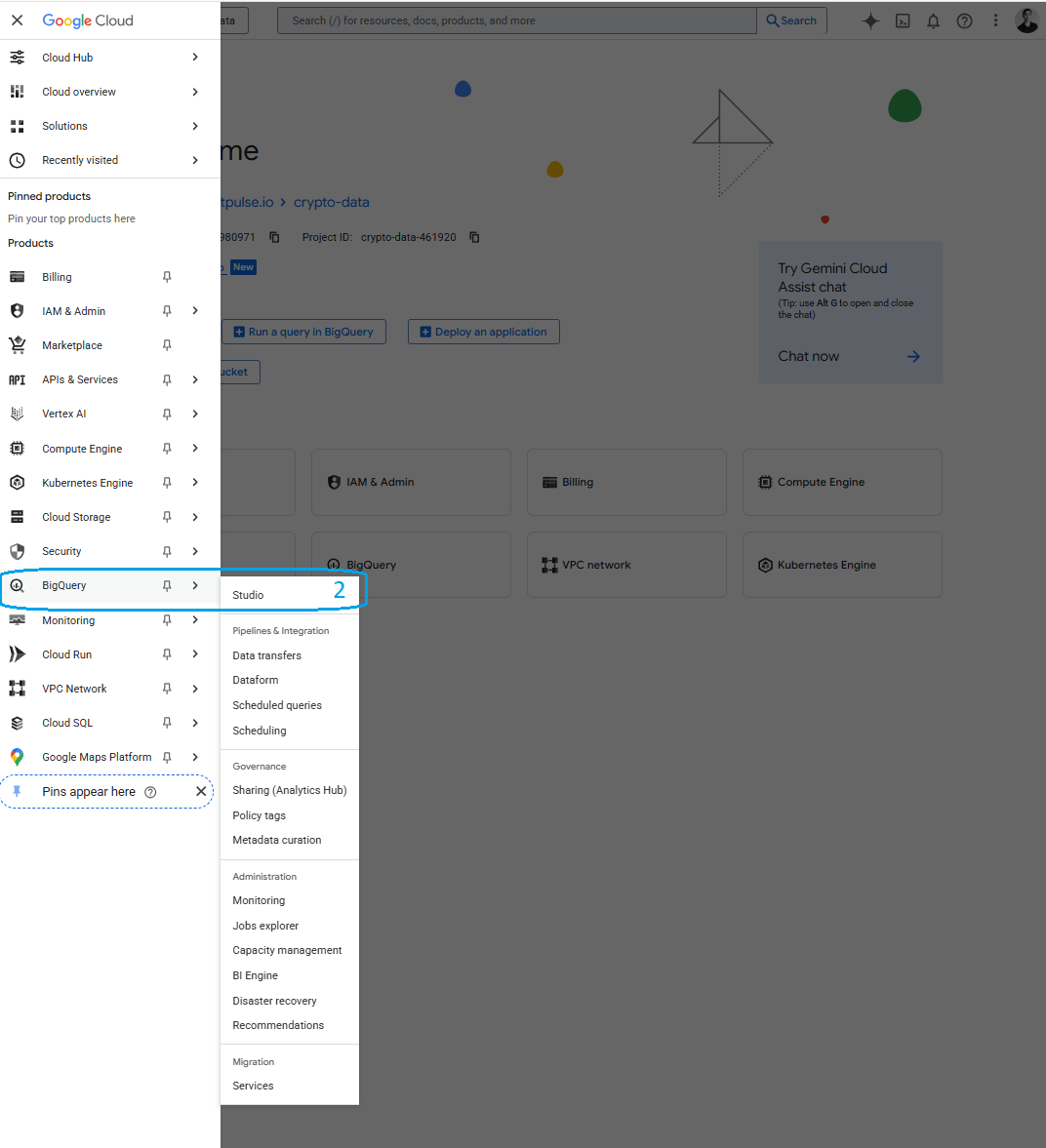
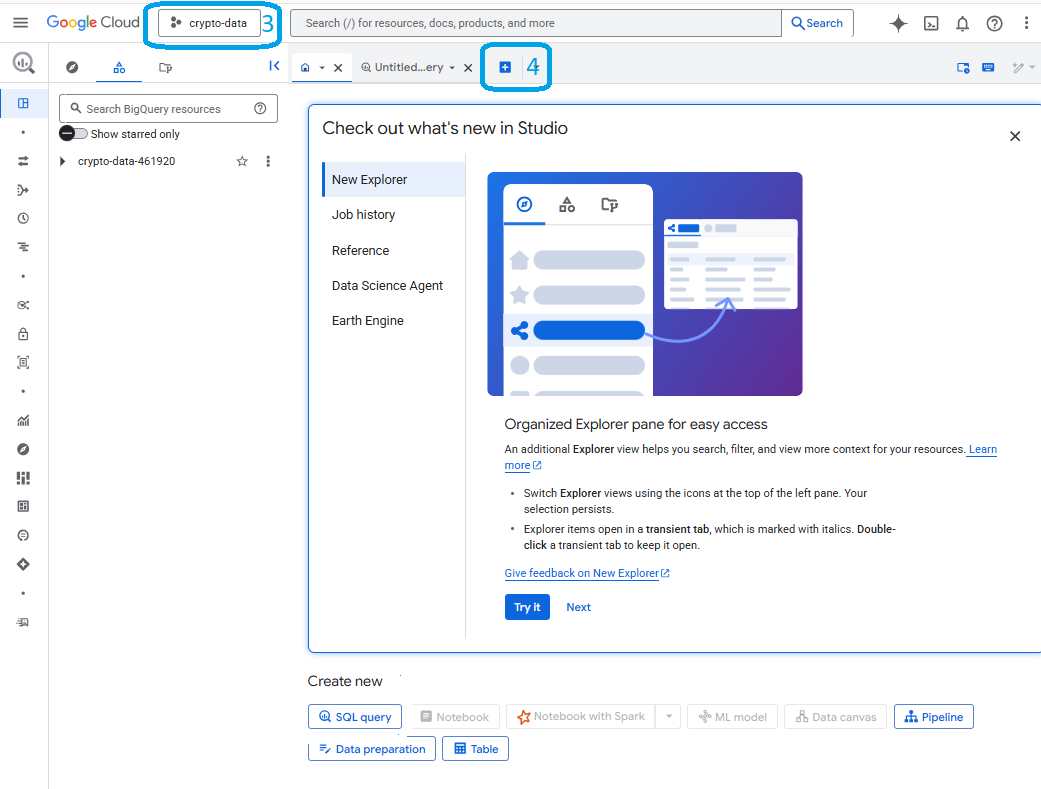
- You should see the cripto-data project selected, if not, click on the name of the current project to select it
- Create a new query clicking on the blue "+"
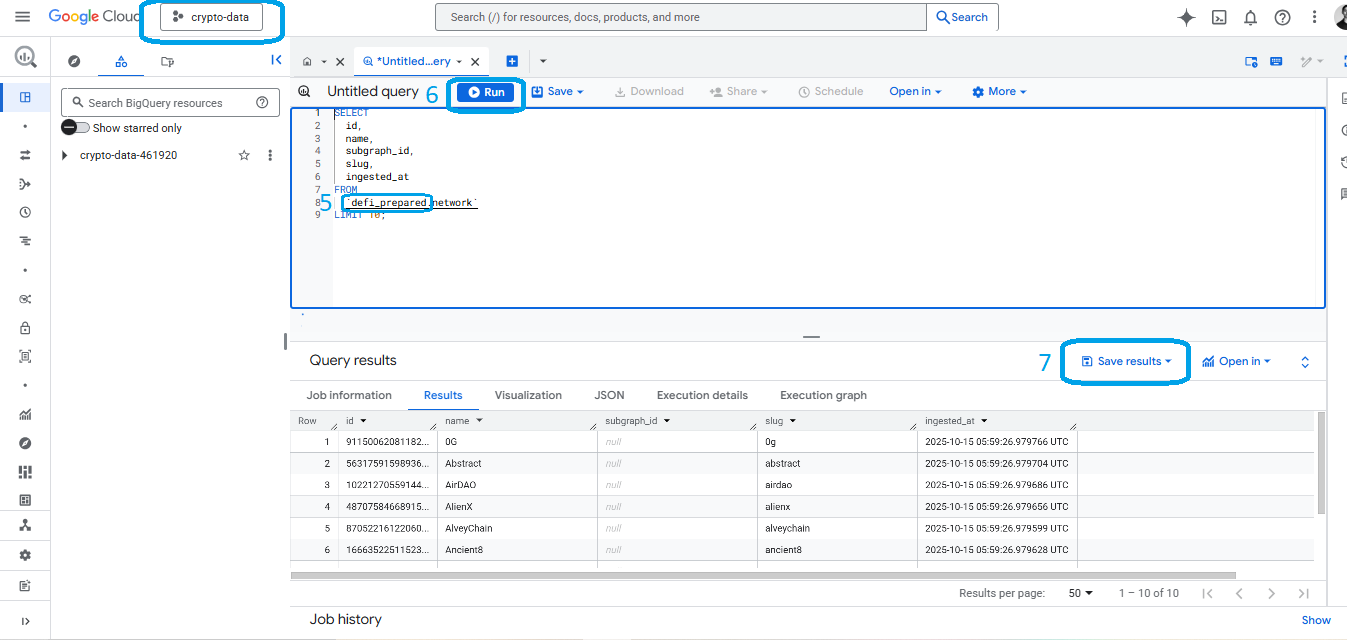
- Create your query always using the dataset prefix "defi_prepared"
- Run you query on the blue "Run" button
- Save/Export you results
Best Practices
-
Use Partitioning: Many tables are partitioned by
block_timestamp. Include this field in yourWHEREclause to improve performance. -
Limit Results: Always use
LIMITin exploratory queries to avoid processing excessive data. -
Join Efficiently: Use the integer IDs for joins rather than strings for better performance.
-
Check Data Freshness: Use queries like this to check the latest available data:
SELECT MAX(block_timestamp) FROM `bitpulse-analytics.defi_liquidity.block`; -
Use Aggregation: Pre-aggregate data when possible to reduce the amount of data processed.
Accessing Data Programmatically
This section explains how to access the Bitpulse Data Catalog programmatically using various programming languages. Whether you're using Python, Node.js, Java, or another language, you'll need a Google Cloud service account with appropriate permissions.
Prerequisites
Before you begin, ensure you have:
- A Google Cloud service account with BigQuery access permissions
- The appropriate BigQuery client library for your programming language
- Basic familiarity with SQL and your chosen programming language
Note: You must request access to the Data Catalog through our Access Permissions form. You'll need to provide your service account email during this process.
Creating a Service Account (If You Don't Have One)
Step 1: Create a Service Account in Google Cloud Console
- Go to the Google Cloud Console → IAM & Admin → Service Accounts
- Click "+ Create Service Account"
- Enter:
- Service account name (e.g.,
bigquery-accessor) - Description (optional)
- Service account name (e.g.,
- Click "Create and continue"
Step 2: Create and Download a JSON Key
- In the list of service accounts, find your new one
- Click the ⋮ (three dots) → "Manage keys"
- Under Keys, click "Add key" → "Create new key"
- Choose JSON → "Create"
- The key file will download automatically — it's your service account key
- Save it securely
Important: Share the service account email (found in the key file) with us through the Access Permissions form. We'll grant this service account access to the Bitpulse Data Catalog.
Integration Examples
Python
- Install the required packages:
pip install google-cloud-bigquery pandas
- Create a Python script to authenticate and query data:
from google.cloud import bigquery
from google.oauth2 import service_account
import pandas as pd

# Path to your service account key file
KEY_PATH = "path/to/your-service-key.json"

# Create credentials using your service account key
credentials = service_account.Credentials.from_service_account_file(
    KEY_PATH,
    scopes=["https://www.googleapis.com/auth/bigquery"]
)

# Initialize the BigQuery client
client = bigquery.Client(
    credentials=credentials,
    project=credentials.project_id
)

# Example query
query = """
SELECT id, slug, name
FROM `defi_prepared.network`
ORDER BY name;
"""

# Execute the query
df = client.query(query).to_dataframe()

# Display results
print(df)
Best Practices for Programmatic Access
Security
-
Store Credentials Securely:
- Never commit service account keys to version control
- Use environment variables or secure secret management solutions
-
Principle of Least Privilege:
- Request only the permissions your application needs
- Create separate service accounts for different applications/purposes
Performance
-
Query Optimization:
- Use parameter queries to prevent SQL injection and improve caching
- Filter on partitioned columns like
block_timestampwhen possible - Limit result sets to only the data you need
- Use
SELECTwith specific column names instead ofSELECT *
-
Resource Management:
- For large datasets, use streaming or chunking to process data efficiently
- Implement pagination for large result sets
Reliability
- Error Handling:
- Implement comprehensive error handling and logging
- Use exponential backoff for retries on transient errors
- Handle API rate limits with appropriate retry mechanisms
Next Steps
Now that you're familiar with the basics, explore the Available Tables section to learn more about each table's schema and relationships.
For performance optimization tips when working with large datasets, check out our Performance Tips guide.
If you have any questions or need assistance, please reach out to us at support@bitpulse.io.